> ## Documentation Index
> Fetch the complete documentation index at: https://blockscout-vb-int-txs-import-timeout.mintlify.site/llms.txt
> Use this file to discover all available pages before exploring further.
# Public Tags: Request and Report Address Labels
> Request public tags for your project's contracts or report incorrect labels on Blockscout, improving address discoverability and search visibility.
Request a public tag for your project's contracts on the public Blockscout instance. Tags appear in search, help create brand awareness for projects, and make exploration easier.
Once submitted, tags are reviewed and accepted/denied manually by the instance admin. If accepted, the tag is added to the public instance. It is also possible to report incorrect public tags through the public tags section.
*The following example is created using the *[*Optimism Blockscout instance*](https://optimism.blockscout.com/)*.*
## Request Public Tags
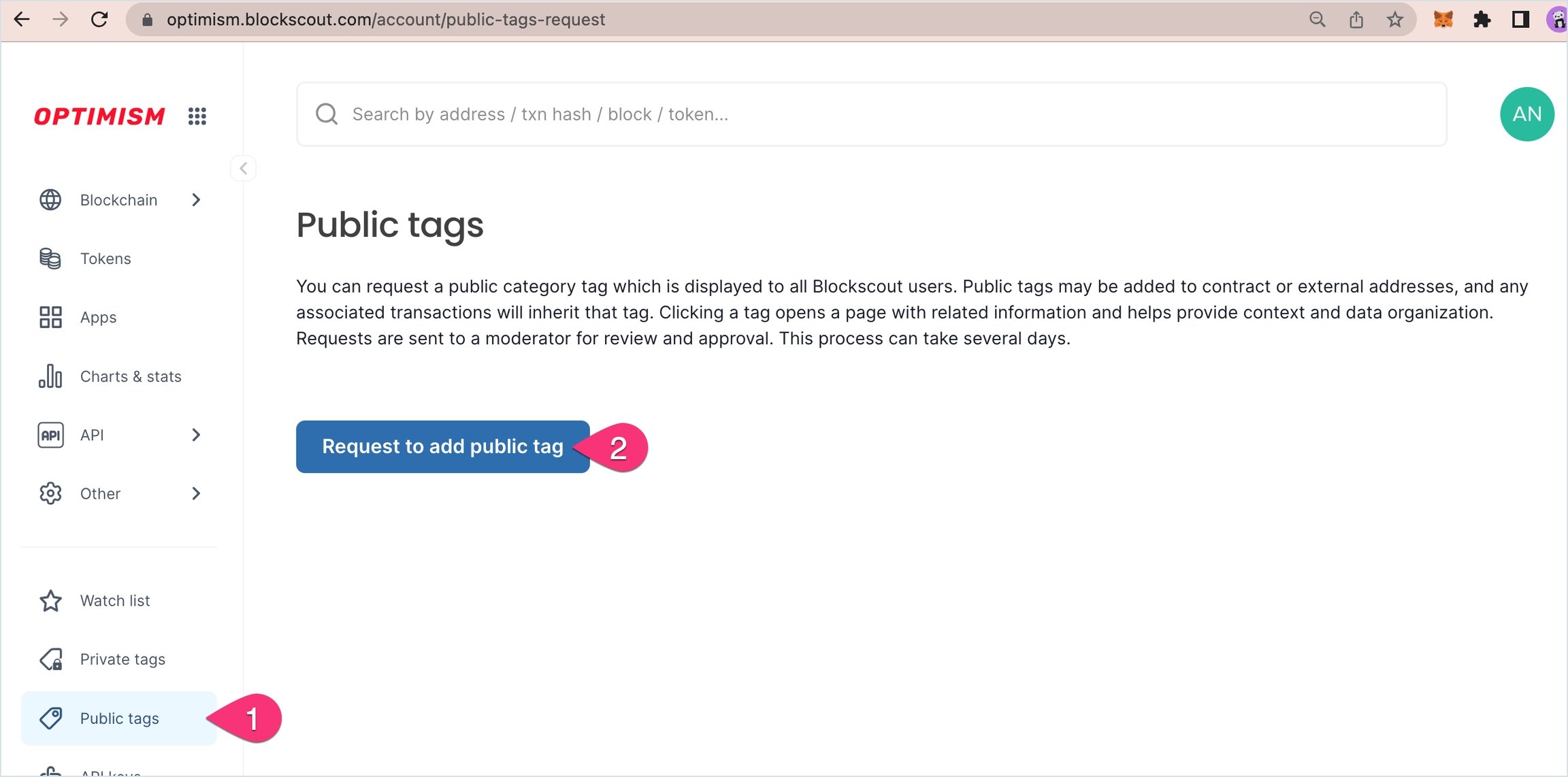
**1) Login to** [**My Account**](/using-blockscout/my-account)
1. Go to **Public tags** in the My Account Menu
2. Press **Request to add public tag**.
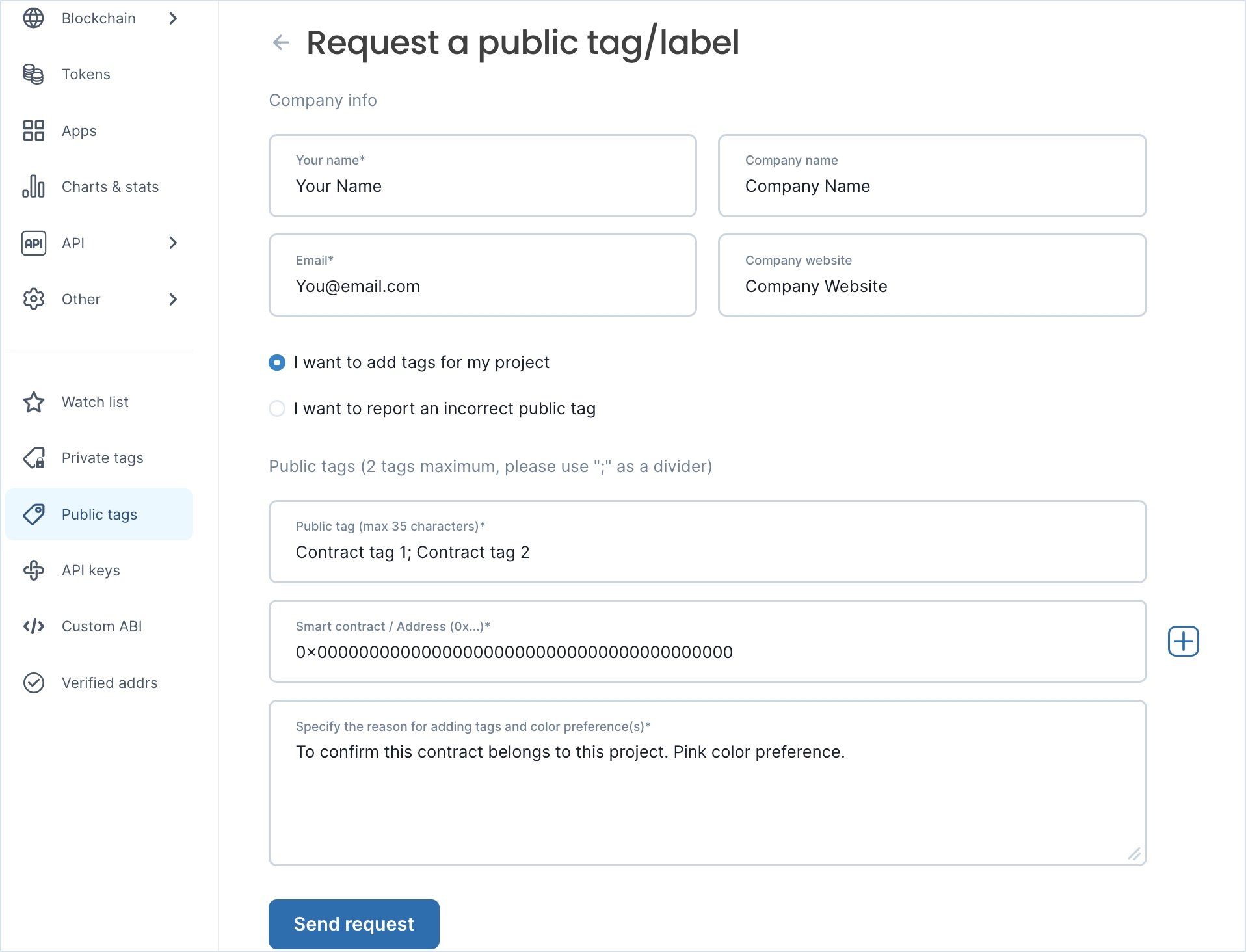
 **2)** **Fill in the fields**. Fields with \* are required.
* Your name\*
* E-mail\*
* Company name
* Company website
* Select either:
1. I want to add tags for my project
2. I want to report an incorrect public tag
* Public tags\*: 2 tags max, 35 character max per tag, use the ; as a separator
* Smart contract / Address (0x...)\*: Provide the 0x address of the contract. If you have several, press the "+" to add.
* Reason and Description\*: Add any relevant details and include your color preference for the tags. Include any other helpful or clarifying information here.
**2)** **Fill in the fields**. Fields with \* are required.
* Your name\*
* E-mail\*
* Company name
* Company website
* Select either:
1. I want to add tags for my project
2. I want to report an incorrect public tag
* Public tags\*: 2 tags max, 35 character max per tag, use the ; as a separator
* Smart contract / Address (0x...)\*: Provide the 0x address of the contract. If you have several, press the "+" to add.
* Reason and Description\*: Add any relevant details and include your color preference for the tags. Include any other helpful or clarifying information here.
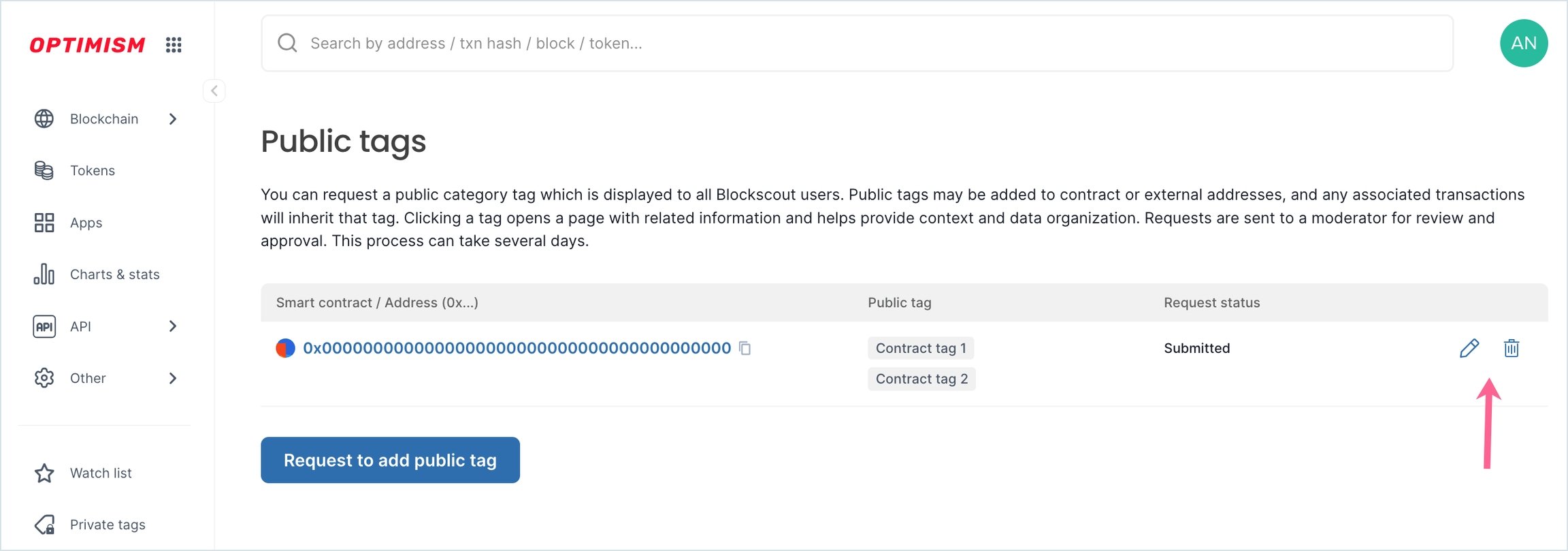
 **3) Public tag request added** to the Public tags home screen. You can edit, request additional tags or delete old tags from here. Public tags are reviewed manually and can take some time in the queue. If your tag request appears in the dashboard it has been successfully submitted and will be reviewed in the order in which it was received.
 ## View public tags on an address
Approved public tags appear on the address page itself, next to the address name or contract name in the header (see [Address Page](/using-blockscout/overviews/address-page)). If the header shows no tag badge, the address does not have an approved public tag on that instance.
Because a public tag is attached to an address (not to the verified contract name), the two can differ. For example, a verified contract named `DexRouter` may render as `OKX Labs: DexRouter` on transaction and address pages when the underlying address carries an `OKX Labs: DexRouter` public tag. The contract name is unchanged; the tag adds project attribution.
## Query public tags via API
Public tags are exposed in several PRO API responses. Two common patterns:
* **On address and contract responses.** The address details endpoint and the verified smart contracts list both include a `public_tags` array on each address object, with `label`, `display_name`, and `address_hash`. Use these to read the tags already attached to a given address without a separate call. Filtering the verified contracts list *by* public tag is not supported; only the `filter` (language, proxy state) and `q` (search) parameters are available on that endpoint.
* **Via the Metadata service.** `GET /services/metadata/api/v1/public-tag-types` returns the tag types configured on the instance. `GET /services/metadata/api/v1/tags:search` searches tags by `chain_id`, `tag_types` (comma-separated), and `name`, and returns the addresses each tag is attached to. Use the tag-types endpoint first to discover valid `tag_types` values, then search.
See the [PRO API overview](/devs/pro-api) for authentication and base URL details.
## View public tags on an address
Approved public tags appear on the address page itself, next to the address name or contract name in the header (see [Address Page](/using-blockscout/overviews/address-page)). If the header shows no tag badge, the address does not have an approved public tag on that instance.
Because a public tag is attached to an address (not to the verified contract name), the two can differ. For example, a verified contract named `DexRouter` may render as `OKX Labs: DexRouter` on transaction and address pages when the underlying address carries an `OKX Labs: DexRouter` public tag. The contract name is unchanged; the tag adds project attribution.
## Query public tags via API
Public tags are exposed in several PRO API responses. Two common patterns:
* **On address and contract responses.** The address details endpoint and the verified smart contracts list both include a `public_tags` array on each address object, with `label`, `display_name`, and `address_hash`. Use these to read the tags already attached to a given address without a separate call. Filtering the verified contracts list *by* public tag is not supported; only the `filter` (language, proxy state) and `q` (search) parameters are available on that endpoint.
* **Via the Metadata service.** `GET /services/metadata/api/v1/public-tag-types` returns the tag types configured on the instance. `GET /services/metadata/api/v1/tags:search` searches tags by `chain_id`, `tag_types` (comma-separated), and `name`, and returns the addresses each tag is attached to. Use the tag-types endpoint first to discover valid `tag_types` values, then search.
See the [PRO API overview](/devs/pro-api) for authentication and base URL details.